A field guide to Donut Place
THE FIRST TEN MINUTES
The game opens with 400 in cash and a shop that has almost nothing in it. For the first ten minutes it tells you what to do, one line at a time, and each line comes with a price tag you can read before you agree to it.
- TESTED one browser session, start to about nine per cent progress, 2026-11-05
- IN-GAME Use the Mouse or Keyboard to Move!, Buy more Tables!, Hire a HR Manager!
- OFFICIAL ONLY no store page describes the opening at all
- NEEDS CHECK whether the opening differs on a phone, and what a fresh save costs you if you restart
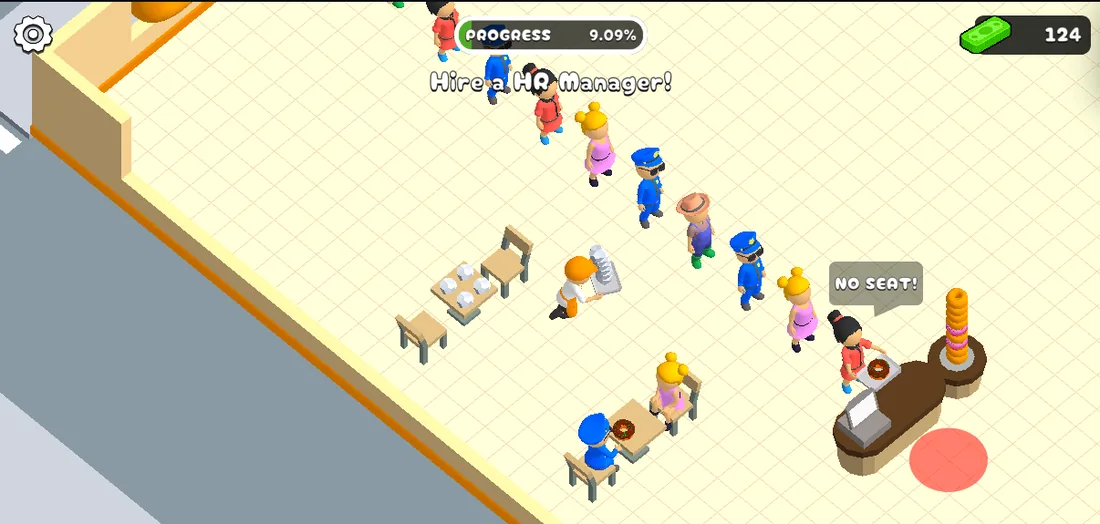
What the first minute looks like
You begin outside, on the pavement, with the shop behind a wall of glass. A
single line sits under the meter: Use the Mouse or Keyboard to Move! There is
no menu, no character creator, no name to enter. Walking in is the whole of the
first step, and the game does not care whether you use WASD, the arrow keys or
the mouse.
Once inside, the floor is mostly empty: a counter with a stack of donuts on it,
a couple of tables, a green bin marked TRASH, and a lot of tiled space with a
pink ring painted on it. That ring is where the game expects you to put things.
The three prompts that matter
The opening is a chain of single lines, each with a tag beside it:
Buy more Tables!— a green tag next to it reads 125. Seats are what turn a queue into paying customers; without them the next line appears anyway.Hire a HR Manager!— an HR room appears on the floor plan and the tag on it reads 120.- Then the queue does the talking. When every seat is taken, a customer stands
with a bubble over their head reading
NO SEAT!and waits.
Prices are printed on the tags, not in a menu, so read them before clicking. We have not confirmed whether the price of a table rises with the number you own.
What we could not do in ten minutes
We reached 9.09% on the progress meter about two minutes in and stopped collecting there. What a donut sells for, how the meter is fed, whether a day ends, and what a save keeps are all still open, and are listed as such on the method page.
A note on the meter
PROGRESS 0% is printed at the top of the screen from the first second. It is
the only long-term number the interface shows; cash moves constantly and is not
a score. Treat the percentage as the game's own answer to "how far along am I",
and the cash figure as today's budget.
Last checked against the client: 2026-11-05 · client web build 2026-11-05